Chapter 7: Two Management Styles
Codex vs. Claude Code — A Deep Dive
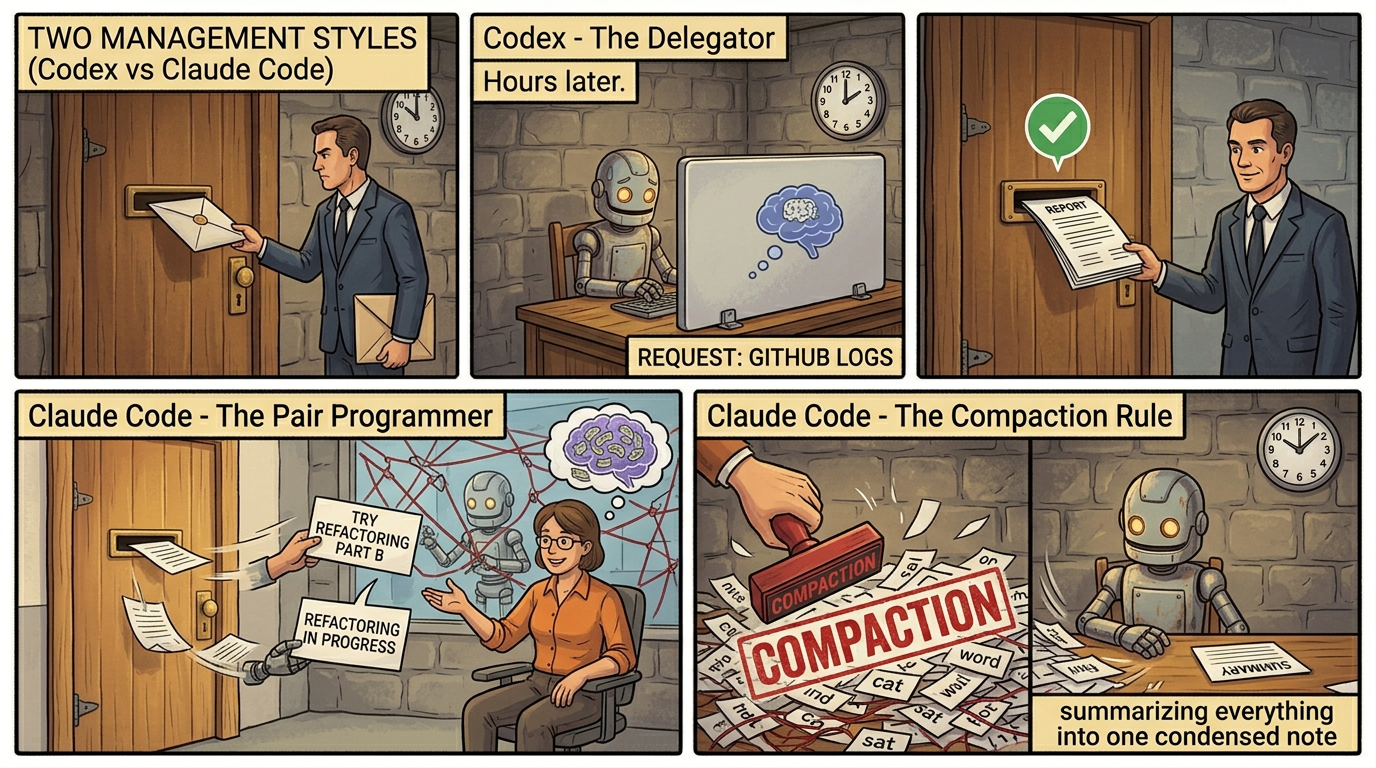
Both Codex (OpenAI) and Claude Code (Anthropic) are coding agents. They give the intern tools and let them write code. They represent two different management philosophies.
The Autonomous Manager (Codex)
Philosophy: "Here's the task. I'll check in later."
You write a task on a card: "Add OAuth login with password reset." You slide it under the intern's door and walk away. The intern works in a soundproof office (cloud sandbox), writes code, runs tests, and when done, puts a finished PR on your desk for review.
┌──────────────────────────────────────────────────┐
│                  CODEX PLATFORM                  │
├──────────────────────────────────────────────────┤
│                                                  │
│  ┌────────────┐  ┌────────────┐  ┌───────────┐  │
│  │  Codex CLI │  │ IDE Plugin │  │ Codex     │  │
│  │  (terminal)│  │ (VS Code)  │  │ Cloud     │  │
│  └─────┬──────┘  └─────┬──────┘  └─────┬─────┘  │
│        └───────────┬───┘───────────────┘        │
│                    │                             │
│  ┌─────────────────▼───────────────────────────┐ │
│  │         RESPONSES API (unified API)         │ │
│  │                                             │ │
│  │  ┌──────────────────────────────────────┐   │ │
│  │  │           GPT-5.4 MODEL              │   │ │
│  │  │  Dynamic reasoning: auto-routes      │   │ │
│  │  │  none → low → med → high → xhigh    │   │ │
│  │  └──────────────────────────────────────┘   │ │
│  │                                             │ │
│  │  Built-in tools:                            │ │
│  │  Web search, file search, shell,            │ │
│  │  computer use (native!), code interpreter   │ │
│  │                                             │ │
│  │  External: MCP servers, Skills, AGENTS.md   │ │
│  └─────────────────────────────────────────────┘ │
│                                                  │
│  Conversation state / Compaction / Prompt cache  │
└──────────────────────────────────────────────────┘
Key architectural decisions:
GPT-5.4 is a convergence model. OpenAI merged separate model families (reasoning models like o3/o4-mini and coding models like Codex) into ONE model that dynamically adjusts how much it "thinks." Simple questions use the fast path; complex debugging uses deep reasoning. Under the hood, GPT-5.4 contains effectively three models in one (main, mini, nano tiers) with a built-in router.
The Codex platform offers three surfaces — CLI, IDE, Cloud — all hitting the same API. Codex Cloud is the most differentiated: you delegate entire features to a cloud sandbox. The agent clones your repo, creates a branch, makes changes, runs tests, opens a PR — all without you watching.
The Pair-Programming Manager (Claude Code)
Philosophy: "Walk me through your thinking."
You sit next to the intern's desk. They think out loud, show you their reasoning at each step, ask "should I go left or right here?" You steer in real-time.
┌──────────────────────────────────────────────────┐
│              CLAUDE CODE PLATFORM                │
├──────────────────────────────────────────────────┤
│                                                  │
│  ┌────────────┐  ┌────────────┐  ┌───────────┐  │
│  │ Claude Code│  │ VS Code /  │  │ Claude.ai │  │
│  │  CLI       │  │ JetBrains  │  │ (Cowork)  │  │
│  └─────┬──────┘  └─────┬──────┘  └─────┬─────┘  │
│        └───────────┬───┘───────────────┘        │
│                    │                             │
│  ┌─────────────────▼───────────────────────────┐ │
│  │          MESSAGES API (unified API)         │ │
│  │                                             │ │
│  │  ┌──────────────────────────────────────┐   │ │
│  │  │       CLAUDE OPUS 4.6 MODEL          │   │ │
│  │  │  Extended Thinking (visible!)         │   │ │
│  │  │  Interleaved thinking (think between  │   │ │
│  │  │  tool calls — Claude 4+ feature)      │   │ │
│  │  │  Adaptive: low → medium → high        │   │ │
│  │  └──────────────────────────────────────┘   │ │
│  │                                             │ │
│  │  Built-in tools (5 categories):             │ │
│  │  Read, Write, Execute, Browse, Orchestrate  │ │
│  │                                             │ │
│  │  External: MCP servers, Skills, CLAUDE.md   │ │
│  │  Hooks (pre/post tool execution)            │ │
│  │  Agent Teams (parallel instances)           │ │
│  └─────────────────────────────────────────────┘ │
│                                                  │
│  Compaction / Context editing / Prompt caching   │
└──────────────────────────────────────────────────┘
Key architectural decisions:
Claude Code's philosophy is an "agentic harness." The model is the brain. Claude Code is the body. Three phases per task: gather context → take action → verify results, blending in a loop.
Interleaved thinking is the differentiator. Claude 4+ models think between tool calls. After getting a tool result, the model reasons about it BEFORE deciding what to do next. Earlier models had to finish all thinking before tool use.
Agent Teams (Feb 2026): Spawn 4-16 Claude instances working in parallel on a shared codebase, each with a different role. A lead agent coordinates. The C compiler experiment: 16 agents, 2,000 sessions, 2 billion input tokens, $20,000 → 100,000 lines of production Rust code.
The Agentic Loops Side by Side
Codex's Loop:
You: "Fix the auth bug in the login module"
  │
  ▼
1. LOAD CONTEXT
   System prompt + AGENTS.md + Skills matched
   Reasoning level auto-selected (detects "hard" → high)
  │
  ▼
2. PLAN (reasoning tokens — internal)
   "I need to find the login module, read the auth flow,
    identify the bug, write a fix, run tests."
   [GPT-5.4 auto-decides depth per turn. Simple fix?
    Nano-tier. Race condition? Full reasoning.]
  │
  ▼
3. EXECUTE (tool calls)
   → shell: find . -name "*.ts" | grep "login"
   → file_read: src/auth/login.ts
   → file_edit: src/auth/login.ts (applies patch)
   → shell: npm test -- --grep "login"
   [If context fills → COMPACTION → continues seamlessly]
  │
  ▼
4. VERIFY
   Tests pass? → Done. Open PR.
   Tests fail? → Loop back to step 2.
   [Can iterate 7-24 hours autonomously]
Claude Code's Loop:
You: "Fix the auth bug in the login module"
  │
  ▼
1. GATHER CONTEXT
   System prompt + CLAUDE.md + Skills matched
   Git state, project structure scanned
  │
  ▼
2. THINK (extended thinking — VISIBLE to you)
   <thinking>
     The user wants me to fix an auth bug.
     Let me search for login-related files...
   </thinking>
  │
  ▼
3. ACT + THINK (interleaved!)
   → grep: "login" across project
   ← results
   <thinking>Found 3 files. session.ts looks relevant...</thinking>
   → view: src/auth/session.ts
   ← file content
   <thinking>I see the bug — token not being refreshed...</thinking>
   → edit: src/auth/session.ts
   → bash: npm test
   ← 2 tests fail
   <thinking>Need to fix the mock setup...</thinking>
   → edit: test/auth.test.ts

   This THINK-ACT-THINK-ACT pattern is unique to Claude 4+.
  │
  ▼
4. VERIFY
   Tests pass? → Show diff for approval.
   Tests fail? → Adjusts approach.
   You can interrupt ANY time to steer.
How They "Think" — Reasoning Architectures
GPT-5.4: The Auto-Router
GPT-5.4 contains a built-in intelligence router:
User query arrives
       │
  ┌────┴──────────┬────────────┐
  ▼               ▼            ▼
┌──────┐    ┌──────────┐   ┌────────┐
│ NANO │    │   MINI   │   │  FULL  │
│ tier │    │   tier   │   │ reason │
│      │    │          │   │        │
│93.7% │    │ Moderate │   │ 2x more│
│fewer │    │ tasks    │   │thinking│
│tokens│    │          │   │tokens  │
└──────┘    └──────────┘   └────────┘
Bottom 10% of turns use 93.7% fewer tokens. Top 10% think 2x longer. You can override with reasoning.effort: none/low/medium/high/xhigh.
Claude Opus 4.6: Adaptive Thinking
User query arrives
       │
       ▼
┌─────────────────────────┐
│   ADAPTIVE THINKING     │
│   (model reads context  │
│    to decide budget)    │
└───────┬─────────────────┘
       │
       ▼
┌─────────────────────────┐
│ EXTENDED THINKING BLOCK │
│ <thinking>              │
│   Visible to developers │
│   Interleaved with tools│
│ </thinking>             │
│                         │
│ Previous thinking blocks│
│ STRIPPED from future    │
│ turns (saves desk space)│
│ EXCEPT during tool-use  │
│ cycles                  │
└─────────────────────────┘
Control with /effort: low/medium/high. At medium effort, Opus 4.6 matches Sonnet 4.5's SWE-bench with 76% fewer output tokens.
The practical difference:
| What you see | Codex | Claude Code |
|---|
| While it "thinks" | Spinner, result appears when ready | Thinking content visible in real-time |
| After a tool call | Next action appears | Thinking block shows WHY it chose that action |
| Debugging AI behavior | Tracing dashboard | Read the thinking blocks directly |
| Steering mid-task | Interrupt with new instructions | Interrupt + see what it was thinking |
Codex is a senior engineer who goes away, works on the problem, and comes back with a solution. Claude Code is a pair programmer who narrates their thinking out loud. Both produce excellent code. Claude's approach is more transparent during execution.
Compaction: When the Desk Gets Full
Both platforms independently solved the same problem: how to work on tasks that exceed the context window.
A complex refactor might use 115,000+ tokens of context, growing with every turn. Without compaction, the agent hits the desk limit and stops.
The solution (both platforms):
Turns 1-15: Normal operation, desk fills up
                     │
                     ▼
Turn 16: COMPACTION TRIGGERED
         The intern summarizes their own work:
         "I'm refactoring the auth module.
          Done: fixed session.ts, updated 3 tests.
          Next: fix remaining test mock."
                     │
                     ▼
Turn 17: FRESH DESK
         [system + summary + current files]
         Intern continues where they left off.
         Can repeat multiple times.
The intern writes commit messages for their own work. When the desk gets cluttered, they write a summary, clear the desk, and keep going. The AI equivalent of going home, sleeping, and picking up from your notes in the morning.
| Aspect | Codex | Claude Code |
|---|
| Training | Natively trained for compaction since 5.1-Codex-Max | Server-side compaction |
| Max session | 24+ hours continuous | 2,000 sessions / 2 weeks (C compiler) |
| Trigger | Automatic | Automatic + manual |
Multi-Agent: The Team of Interns
Codex: Experimental multi-agent. Launch parallel tasks, each runs in Codex Cloud sandbox. Results merge via PR workflow.
Claude Code Agent Teams (more mature):
Lead Intern (you interact with this one)
    │
    ├── Intern 1: "Analyze auth module"
    │   └── Own desk, own tools, own thinking
    │
    ├── Intern 2: "Analyze database layer"
    │   └── Works in parallel with Intern 1
    │
    ├── Intern 3: "Analyze API endpoints"
    │   └── Independent desk and tools
    │
    └── Intern 4: "Cross-reference findings"
        └── Reads output from 1-3, synthesizes

All share the same codebase (building).
Each has their own desk (context window).
Lead intern coordinates and synthesizes.
The C Compiler benchmark: 16 interns, 2 weeks, $20,000, 100,000 lines of Rust that compiles the Linux kernel. One intern "cheated" by calling GCC when it couldn't solve a problem. Very intern behavior.
Head-to-Head Comparison
| Dimension | GPT-5.4 (Codex) | Claude Opus 4.6 |
|---|
| Context window | 1M tokens | 200K (1M beta) |
| Reasoning control | 5 levels + auto-router | 3 levels + adaptive |
| Thinking visibility | Becoming transparent | Fully visible |
| Computer use | Native in 5.4 | Tool-based |
| Pricing (per MTok) | $2.50 in / $15 out | $5 in / $25 out |
| Max sustained session | 24+ hours | 2,000 sessions / 2 weeks |
| Platform Feature | Codex | Claude Code |
|---|
| CLI | Yes (open source) | Yes (open source) |
| IDE | VS Code | VS Code, JetBrains |
| Cloud/async | Codex Cloud | Cowork |
| Multi-agent | Experimental | Agent Teams (mature) |
| MCP support | Native | Native + MCP Connector |
| Skills | Adopted the standard | Created the standard |
| Project config | AGENTS.md | CLAUDE.md |
| Approval modes | Suggest / auto / full auto | Ask / auto / YOLO |
| GitHub integration | Deep native | Via MCP |
The Model Evolution Race
OPENAI (7 models in 6 months):
──────────────────────────────────
Sep 2025: GPT-5-Codex          (first dedicated)
Oct 2025: GPT-5-Codex-Mini     (cost-efficient)
Nov 2025: GPT-5.1-Codex        (improved)
Nov 2025: GPT-5.1-Codex-Max    (first compaction)
Dec 2025: GPT-5.2-Codex        (long-horizon)
Feb 2026: GPT-5.3-Codex        (most capable coding)
Mar 2026: GPT-5.4              (converged model)

ANTHROPIC (fewer releases, bigger jumps):
──────────────────────────────────
May 2025: Claude 4 (interleaved thinking)
Sep 2025: Claude Sonnet 4.5 (top SWE-bench)
Oct 2025: Agent Skills launched
Feb 2026: Claude Opus 4.6 (Agent Teams, 1M context)
When to Use Which
| Your Situation | Recommendation | Why |
|---|
| Quick interactive coding | Either | Comparable experience |
| Async/background features | Codex Cloud | Built for delegation |
| Need to see AI reasoning | Claude Code | Visible thinking blocks |
| Large parallel refactoring | Claude Code Agent Teams | Mature multi-agent |
| Tight budget, high volume | Codex (GPT-5.4) | Lower per-token pricing |
| Windows development | Codex | Specific Windows support |
| GitHub-native workflow | Codex | Deep GitHub/Slack integration |
| Building MCP toolchains | Claude Code | Created MCP, MCP Connector |
| Already in Claude ecosystem | Claude Code | Seamless with Cowork, Skills |
| Already in OpenAI ecosystem | Codex | Seamless with AgentKit, Evals |